

New Upgraded HY300 Pro+ Mini Projector with WiFi and Bluetooth Built in Apps, Smart Portable Projector with 180° Rotation, Auto Keystone, Support 4K, Compatible with HDMI/USB/TV Stick/phone/Laptop
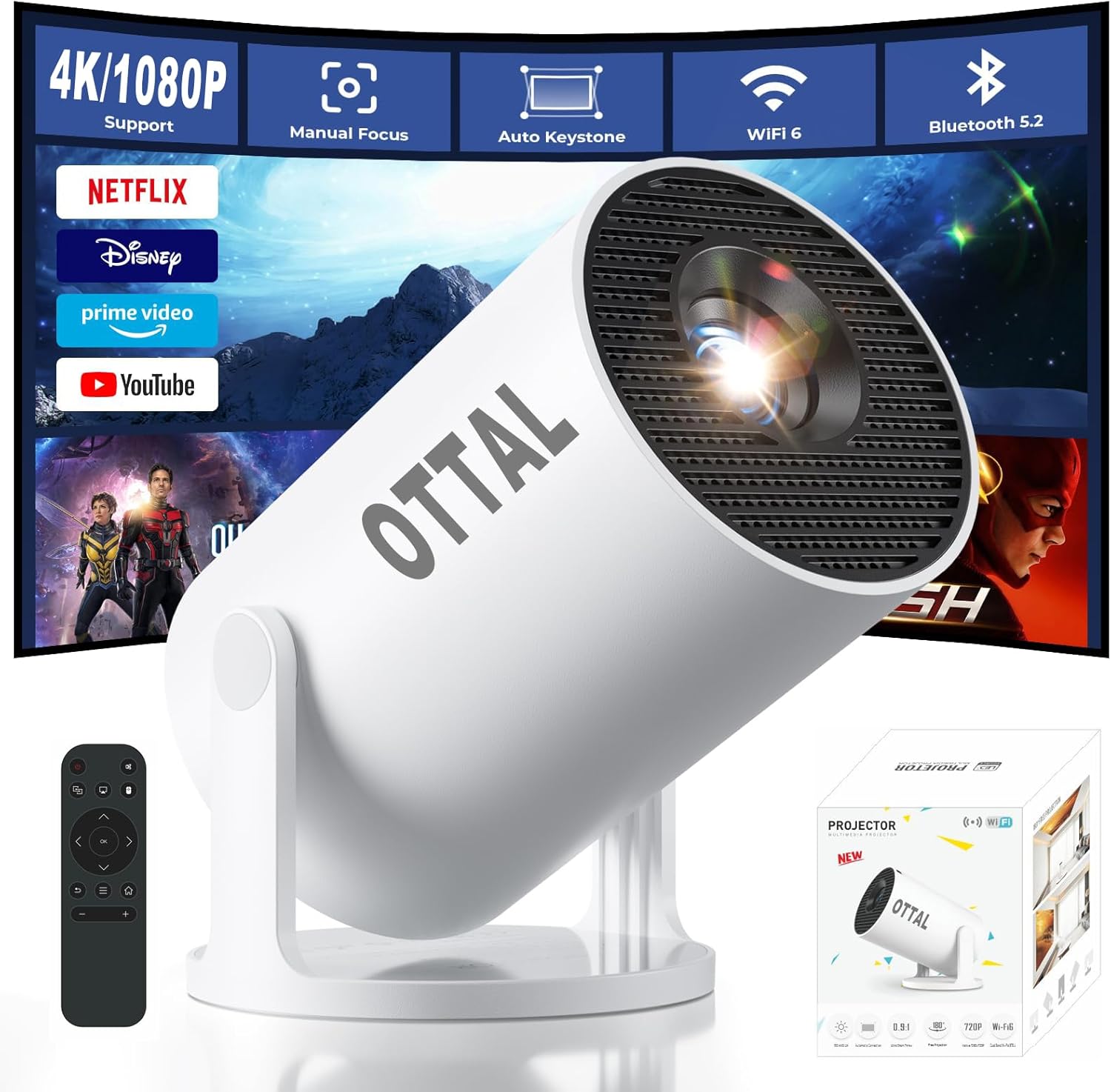
New Upgraded HY300 Pro+ Mini Projector with WiFi and Bluetooth Built in Apps, Smart Portable Projector with 180° Rotation, Auto Keystone, Support 4K, Compatible with HDMI/USB/TV Stick/phone/Laptop
$81.64
Next Shipment In
Order by 12th March
Receive by 24th March
Price includes freight & customs charges.
For any concerns, our 24/7 online support team is available to assist you with technical issues or product inquiries. We offer troubleshooting guidance, as well as repair or replacement services if needed.
Important Note – Must-Read
Due to the HDCP (High-bandwidth Digital Content Protection) agreement, screen mirroring may not function properly (no image or sound) when attempting to mirror content from certain apps, such as Amazon Prime Video, Netflix, Hulu, and others.
How can I access Netflix, Prime Video, and YouTube?
1.Ensure your device is updated to the latest version.
2.Go to Appstore on the home page
3.Update the apps to the latest version to use them
How do I screen-mirror iOS devices to the HY300Pro+?
1.Ensure your device is updated to the latest version.
2.Open the Airpin or ScreenCast app.
3.Use AirPlay on your iOS device, making sure both devices are connected to the same Wi-Fi network.
What Should I Do if the HY300Pro+ Projector Can’t Connect to Wi-Fi?
1. Verify the time zone under Settings > Date and time Setting
2. Switch to another Wi-Fi network or use a mobile hotspot.
3. Test both 2.4GHz and 5GHz bands.
4. Reset via Settings>Other Settings>Factory Reset Settings
What Should I Do if the Remote Control Doesn’t Respond when Using the App?
Many apps on the projector are mobile versions, which require switching to mouse mode for proper operation. Please press the mouse button on your remote control to switch to the air mouse mode and proceed.
As a global brand present in 153 countries, OTTAL not only focuses on global market demands but also emphasizes providing localized, high-quality experiences tailored to each country and region.
Our mission is to deliver high-quality, affordable cinematic visual feasts for projector enthusiasts worldwide. With OTTAL, every family can easily enjoy an immersive big-screen experience-whether in the living room, backyard, or on the go.

For any concerns, our 24/7 online support team is available to assist you with technical issues or product inquiries. We offer troubleshooting guidance, as well as repair or replacement services if needed.
Important Note – Must-Read
Due to the HDCP (High-bandwidth Digital Content Protection) agreement, screen mirroring may not function properly (no image or sound) when attempting to mirror content from certain apps, such as Amazon Prime Video, Netflix, Hulu, and others.
How can I access Netflix, Prime Video, and YouTube?
1.Ensure your device is updated to the latest version.
2.Go to Appstore on the home page
3.Update the apps to the latest version to use them
How do I screen-mirror iOS devices to the HY300Pro+?
1.Ensure your device is updated to the latest version.
2.Open the Airpin or ScreenCast app.
3.Use AirPlay on your iOS device, making sure both devices are connected to the same Wi-Fi network.
What Should I Do if the HY300Pro+ Projector Can’t Connect to Wi-Fi?
1. Verify the time zone under Settings > Date and time Setting
2. Switch to another Wi-Fi network or use a mobile hotspot.
3. Test both 2.4GHz and 5GHz bands.
4. Reset via Settings>Other Settings>Factory Reset Settings
What Should I Do if the Remote Control Doesn’t Respond when Using the App?
Many apps on the projector are mobile versions, which require switching to mouse mode for proper operation. Please press the mouse button on your remote control to switch to the air mouse mode and proceed.
As a global brand present in 153 countries, OTTAL not only focuses on global market demands but also emphasizes providing localized, high-quality experiences tailored to each country and region.
Our mission is to deliver high-quality, affordable cinematic visual feasts for projector enthusiasts worldwide. With OTTAL, every family can easily enjoy an immersive big-screen experience-whether in the living room, backyard, or on the go.
You must be logged in to post a review.
-13%

-46%

Jackets
Original price was: $35.00.$19.00Current price is: $19.00.
This product has multiple variants. The options may be chosen on the product page
-26%

Original price was: $432.85.$321.36Current price is: $321.36.
![Lenovo Tab M11 4G LTE with Folio Case and Pen,11" WUXGA (1920x1200) IPS 400nits Anti-fingerprint 90Hz Touch display, Octa-Core Processor, 4GB RAM, 128GB Storage, Android 13 - [ZADB0031AE]](https://www.dxbrunners.com/wp-content/uploads/2025/12/61Q49w6RqJL._AC_SL1500_-100x100.jpg)


Reviews
There are no reviews yet