

-
×
 DOOGE Blade10 Max Rugged Phone 6.56" 90Hz Display 8GB+256GB Rear Display 50MP AI Main Camera 10300mAh 18W Charge
- Vendor:
-
×
OGX Pink sea salt & rosewater gentle soothing body scrub, 19.5 Ounce
- Vendor:
-
×
Smart Pouch Cover, Keyboard with Touch Pad, Compatible with Samsung Galaxy Tab S8/Tab S7 11 inch Thin (Supporting Arabic Input) Black
- Vendor:
-
×
Yamaha PSR-E383 61 Touch Sensitive Keys Portable Keyboard for Beginners with Music Rest, Power Adapter
- Vendor:
 DOOGE Blade10 Max Rugged Phone 6.56" 90Hz Display 8GB+256GB Rear Display 50MP AI Main Camera 10300mAh 18W Charge
  OGX Pink sea salt & rosewater gentle soothing body scrub, 19.5 Ounce
  Smart Pouch Cover, Keyboard with Touch Pad, Compatible with Samsung Galaxy Tab S8/Tab S7 11 inch Thin (Supporting Arabic Input) Black
  Yamaha PSR-E383 61 Touch Sensitive Keys Portable Keyboard for Beginners with Music Rest, Power Adapter
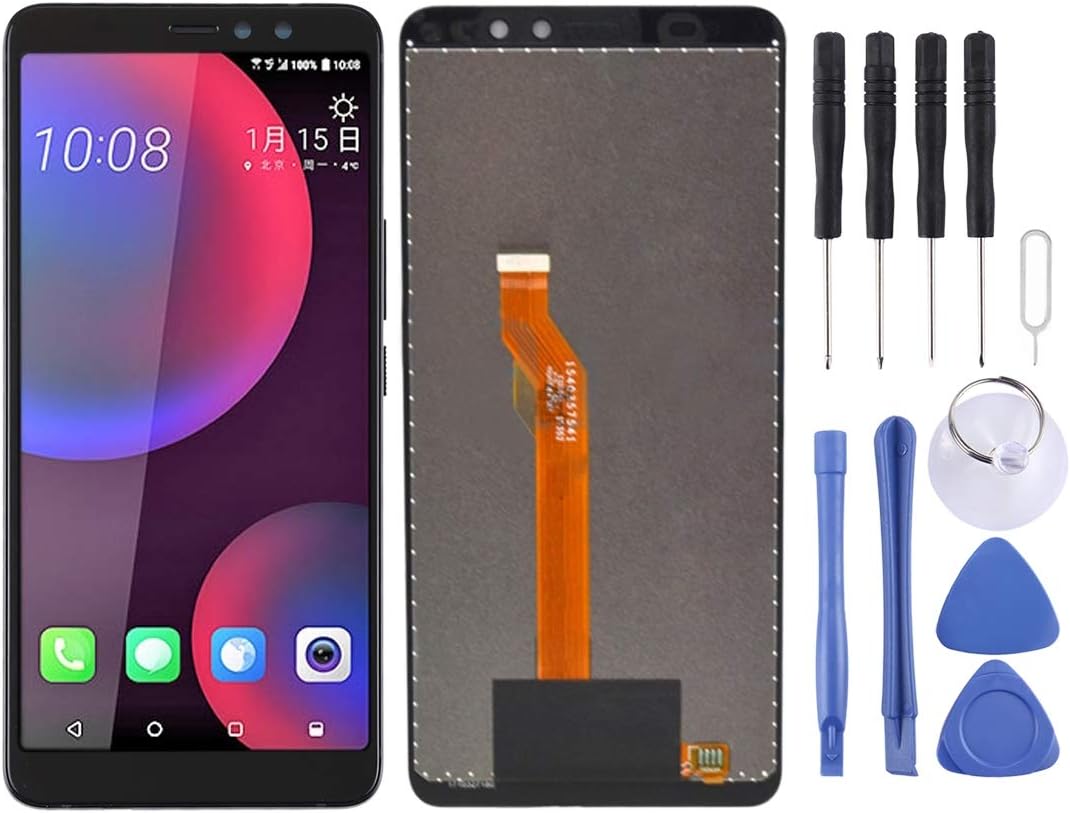
 LCD Screen for HTC U11 Eyes with Digitizer Full Assembly (Black)
LCD Screen for HTC U11 Eyes with Digitizer Full Assembly (Black)
$67.90
Next Shipment In
Order by 12th March
Receive by 24th March
Price includes freight & customs charges.
About the product 1. Replacement LCD display + touch screen digitizer assembly for HTC U11 Eyes. 2. Replace the old, broken, cracked, damaged one. 3. Make your device look more refreshing than ever. 4. Completely fit and work. 5. Each item has been checked and in good condition before shipping. 6. Professional installation is highly recommended. We will not be responsible once the screen is installed. Before Installation Notes 1. Tips 1: Test before installation When testing, do not remove any protective film or tags. Please pay attention to the problem of static electricity. Before attempting any repair, be sure to ground yourself is an ESD (electro static discharge) strap. This will prevent static electricity from damaging the electronic components within the phone. Ensure you wear eye protection and use caution not to cut your finger with the glass splinters. 2. Tips 2: Simulates testing Screen replacement is very fragile product. We strongly suggest test before installation. Please simulates testing, which means mobile phone apart, (motherboard + LCD or screen) connected audio cable and new replacement, power on, test finished. If test OK, please install it. If it can not show, please contact us at the very first time. And please do not force it to be installed in mobile phone. We will not be responsible once the screen is installed. 3. Tips 3: Do not over-bend cable Please make sure LCD cable Do not over-bend. Over 90 degrees bent will cause black display.

About the product 1. Replacement LCD display + touch screen digitizer assembly for HTC U11 Eyes. 2. Replace the old, broken, cracked, damaged one. 3. Make your device look more refreshing than ever. 4. Completely fit and work. 5. Each item has been checked and in good condition before shipping. 6. Professional installation is highly recommended. We will not be responsible once the screen is installed. Before Installation Notes 1. Tips 1: Test before installation When testing, do not remove any protective film or tags. Please pay attention to the problem of static electricity. Before attempting any repair, be sure to ground yourself is an ESD (electro static discharge) strap. This will prevent static electricity from damaging the electronic components within the phone. Ensure you wear eye protection and use caution not to cut your finger with the glass splinters. 2. Tips 2: Simulates testing Screen replacement is very fragile product. We strongly suggest test before installation. Please simulates testing, which means mobile phone apart, (motherboard + LCD or screen) connected audio cable and new replacement, power on, test finished. If test OK, please install it. If it can not show, please contact us at the very first time. And please do not force it to be installed in mobile phone. We will not be responsible once the screen is installed. 3. Tips 3: Do not over-bend cable Please make sure LCD cable Do not over-bend. Over 90 degrees bent will cause black display.
You must be logged in to post a review.

-9%
Brand New
Original price was: $144.20.$130.81Current price is: $130.81.


Reviews
There are no reviews yet